Installation
Where do I install Click Image Zoom? From the official Chrome Web Store listing: Official Chrome Web Store listing
Installing from the Chrome Web Store is the documented path. The store is Google's official distribution channel for Chrome extensions.
Do I need to create an account? No account is required for the documented core workflow: triggering the viewer, zooming up to 10x, panning, and using local AI enhancement.
Does it work on mobile? The documented product is a Chrome browser extension. Mobile support is not currently documented, so verify compatibility before relying on it.
Trigger Keys and Usage
How do I open an image in the viewer? Hold one of four modifier keys—Shift, Alt, Ctrl, or Command—and click an image on a webpage. The viewer opens in-page. Scroll to zoom (up to 10x) and drag to pan.
Can I use it without holding a key? No. The modifier key + click is the documented activation method. Users who want zero-key-press hover previews should look at hover preview extensions instead; Click Image Zoom is not designed for that interaction pattern.
Which modifier key should I use? Any of the four—Shift, Alt, Ctrl, or Command—works. You can choose whichever is most comfortable. Check the extension settings if you want to configure a preferred key.
Browser and Site Compatibility
Does Click Image Zoom work in Firefox, Safari, or Edge? The official product is documented and distributed as a Chrome extension. Support for Firefox, Safari, Edge, or other browsers is not currently documented.
Does it work on every website? The extension does not control how individual websites store or serve their images. Compatibility varies by site. Some sites use image formats or loading techniques that the extension may not interact with as expected.
Does it work on every image on a page? Behavior depends on how the site renders its images. The extension works within Chrome on sites where it can access image elements in the standard way.
Privacy
Does Click Image Zoom upload my images to a cloud service? For AI enhancement, no. The 4x Real-ESRGAN upscaling runs locally on your device. Image pixels are not uploaded to a cloud AI service for enhancement.
The extension does not control how the original website stores or serves its images—it only works with what the browser has already loaded. Review the extension's permissions on the Chrome Web Store listing to understand exactly what browser access it requests.
Does it collect browsing data? For specific data collection practices, refer to the extension's privacy policy linked from the Chrome Web Store listing. The Chrome Web Store requires developers to disclose data use.
Can image zoom extensions compromise my privacy? Any browser extension that has access to webpage content could, in principle, read data on those pages—that is why reviewing permissions before installing matters. For Click Image Zoom specifically: the documented enhancement workflow does not send image pixels to a cloud AI service. For broader privacy questions about any extension, the Chrome Web Store listing, the developer's privacy policy, and the extension's declared permissions are the appropriate sources to consult.
Source Verification and Malware Concerns
Is Click Image Zoom guaranteed to be malware-free? No website copy can provide that guarantee. Use the official Chrome Web Store listing, review the requested permissions and linked privacy information, and verify that the installed extension ID matches the official listing before deciding whether to install or keep it.
How do I verify I have the official extension? In Chrome, go to chrome://extensions, find Click Image Zoom, and check that the extension ID matches the one in the official Chrome Web Store URL: lmlmlkdfgcbickfngnhnmfajmenoeoll.
What if I'm worried about an extension I already installed? If you installed from a source other than the official Chrome Web Store, or if you are uncertain, you can remove the extension from chrome://extensions and reinstall from the official listing.
AI Enhancement
Can AI enhancement run automatically? AI enhancement supports both manual and automatic triggering. In settings, you can configure automatic enhancement when opening an image or first zooming in, or trigger it manually when needed.
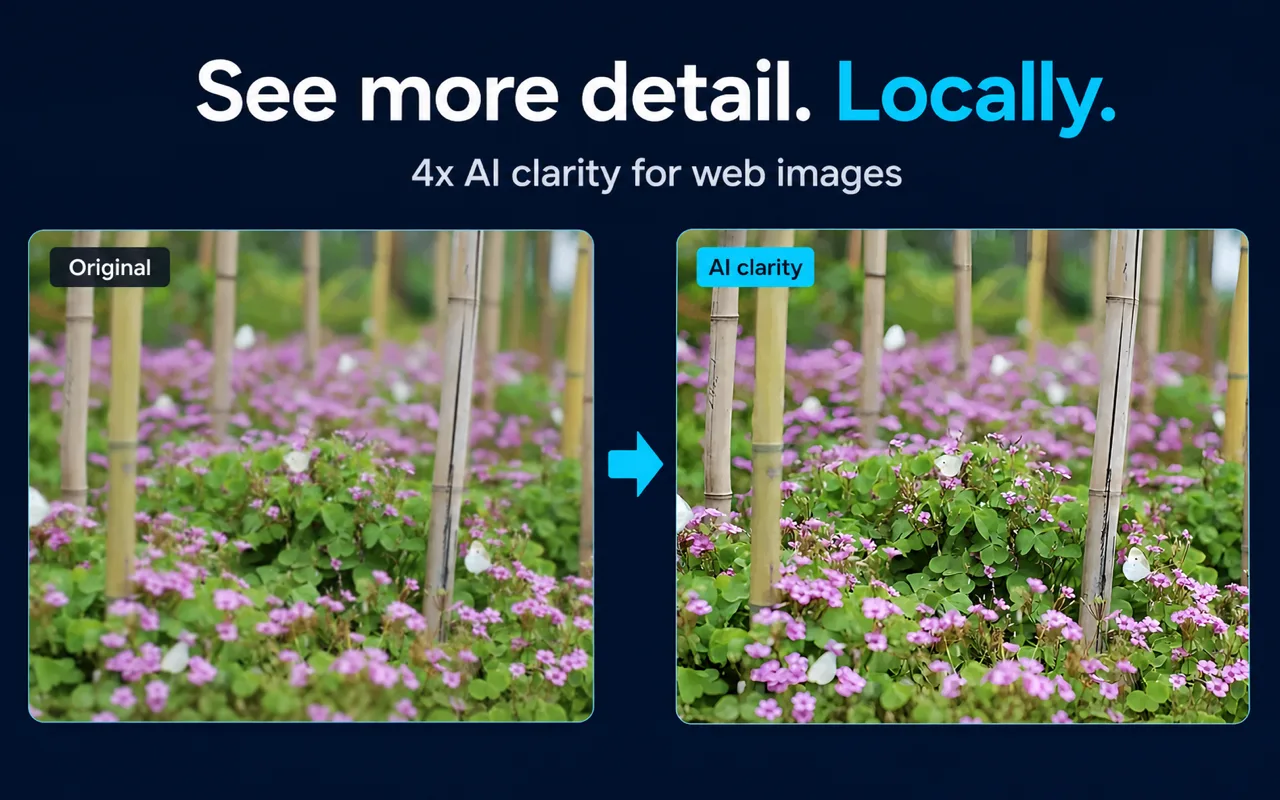
What does the local AI enhancement do? It applies 4x upscaling using Real-ESRGAN, running on your device. You can choose speed-first or quality-first processing. You can also set a maximum processing size to limit how much of your device's CPU/GPU and memory the enhancement uses.
Can AI enhancement recover text or fine detail in a blurry image? AI enhancement can improve visible clarity, but it cannot recover reliable factual detail that never existed in the source image. If the original image lacks detail, upscaling will make it larger and smoother, not more accurate.
What happens if AI enhancement isn't available? If the AI model cannot run—because the image exceeds your size limit, or because your device cannot support the processing—the viewer, normal zoom, pan, and standard clarity mode remain usable. The fallback is functional.
Pricing
Is Click Image Zoom free? Yes. Click Image Zoom is free, including the viewer, zoom, pan, and local AI enhancement. No account or subscription is required.
Are there hidden costs? No cloud AI subscription is required for the documented workflow. The real resource cost is local: AI enhancement uses your device's CPU/GPU and memory. You can control this by setting a maximum processing size in the extension settings.
Key Facts
| Fact | Detail | Source |
|---|
| Activation | Shift, Alt, Ctrl, or Command + click | Product documentation, verified 2026-07-30 |
| Maximum viewer zoom | 10x | Product documentation, verified 2026-07-30 |
| AI enhancement | 4x, Real-ESRGAN, local | Product documentation, verified 2026-07-30 |
| Cloud AI pixel upload | None for enhancement | Product documentation, verified 2026-07-30 |
| Account required | No, for documented core workflow | Product documentation, verified 2026-07-30 |
| Browser availability | Officially documented for Chrome | Product documentation, verified 2026-07-30 |
| Official install source | Chrome Web Store | Chrome Web Store listing |
Related Guides
Sources and Scope
Facts on this page are drawn from Click Image Zoom product documentation (last verified 2026-07-30) and the official Chrome Web Store listing. Verification guidance does not claim the absence of all possible risk. Pricing is not stated as a permanent fact; verify current terms at the Chrome Web Store.
Last reviewed: July 31, 2026